BrazoRobot
A 5-axis robotic arm with gripper that first learns to move in a physics simulator and then repeats the movement on the bench. Kinematics in Python, a MuJoCo twin, an ESP8266 bridging to the servos, and a website with a 3D viewer of the real arm.
What is it?
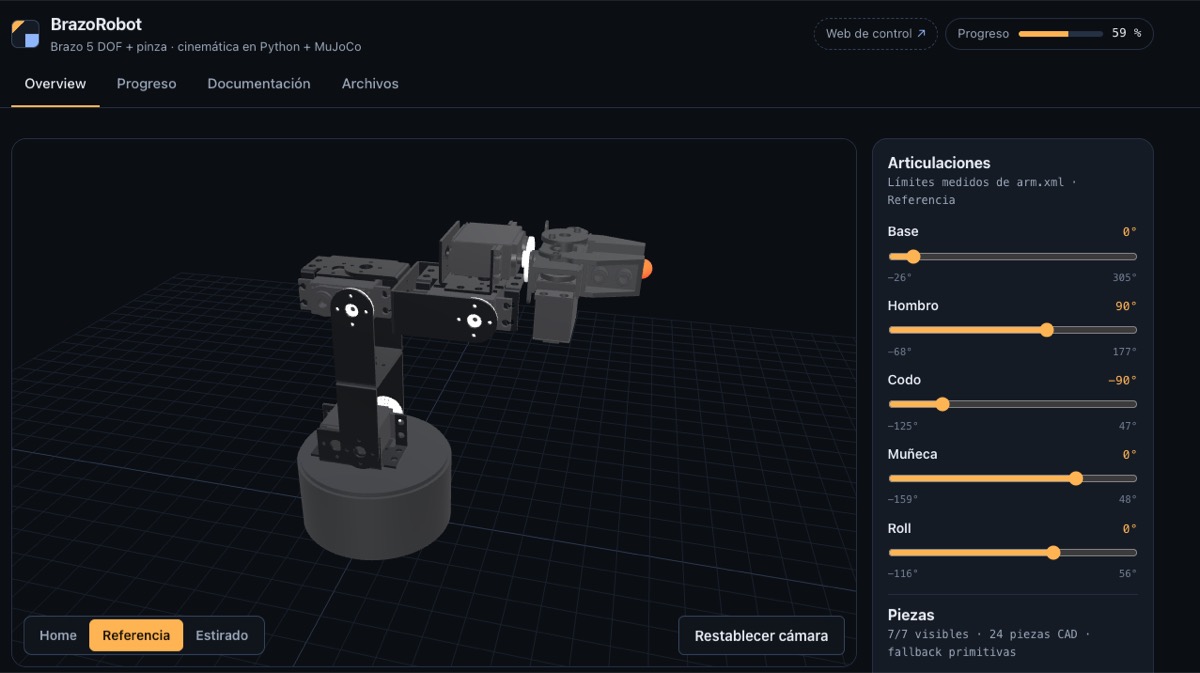
An aluminium robotic arm with 5 degrees of freedom plus a gripper, built on a Lynxmotion kit and driven by six servos. What makes it mine is not the arm itself but everything around it: the kinematics in Python, a twin of the arm in the MuJoCo physics simulator, a small electronic bridge that turns what the laptop computes into real movement, and a website with a 3D viewer that shows the arm exactly as it is, with its real parts.
Why I built it
I wanted to learn robotics first in simulation, then on the bench. The idea is that the same code that moves the simulated arm also moves the real one, and then measure how close they are. That is why the brain lives on the laptop and the microcontroller just obeys: it receives the position of each servo and applies it.
How it works
Simulation
- Inverse kinematics: you say where you want the tip of the gripper and the arm works out how to place each joint.
- Smooth trajectories: movements accelerate and brake progressively, with no jerks.
- Reach map: how far the arm reaches and where it stops reaching.
- Pick-and-place demo: the simulated arm picks up an eraser and drops it somewhere else, rotating the wrist before closing the gripper so it grabs the short side.
From laptop to arm
An ESP8266 connected over USB receives the commands from the laptop and passes them to the servos through a PWM controller. Each servo has its own range, and every movement ramps up and down smoothly. There is a simulated version of the bridge to test the software without the arm plugged in.
Control web app
A web tool, running on the laptop itself, to calibrate the servos, record sequences by moving the arm by hand, tune the geometry with a ruler and switch between the simulated and the real arm without restarting anything.
3D viewer
The viewer model comes from the real CAD of the arm parts, exported from FreeCAD. The CAD measurements are the ones the kinematics uses, so what you see on screen matches what sits on the bench.
Roadmap
| Phase | Scope | Status |
|---|---|---|
| Simulation | MuJoCo model, kinematics, trajectories and reach map | Done |
| Electronics | ESP8266, servo controller and power supply moving a servo from the laptop | Done |
| Serial bridge | The laptop sends positions and the arm executes them with a smooth ramp | Done |
| New elbow | Replace the elbow servo, which burnt out | Done |
| Emergency stop | Add a stop that cuts the power | Pending |
| Calibration | Measure the real travel of the six servos | Done |
| Sequences on the real arm | Replay on the real arm the sequences planned in the web app | Done |
| Geometry | Tune the real arm's measurements with a ruler | In progress |
| Sim-to-real | The same trajectory in simulation and for real, measuring the difference | Pending |
| Project website | 3D viewer, progress, documentation and files | Done |
| Reinforcement learning | Train a policy in the simulator to move the arm | Pending |
Stack
- Kinematics and simulation: Python, NumPy and MuJoCo
- Electronics: ESP8266 with Arduino firmware and a PCA9685 servo controller
- Web: React, Vite and three.js, deployed on Vercel
- CAD: FreeCAD
Links
- Project website: https://brazorobot.vercel.app
- Instagram reel: https://www.instagram.com/reel/DeFycK5MWLJ/